
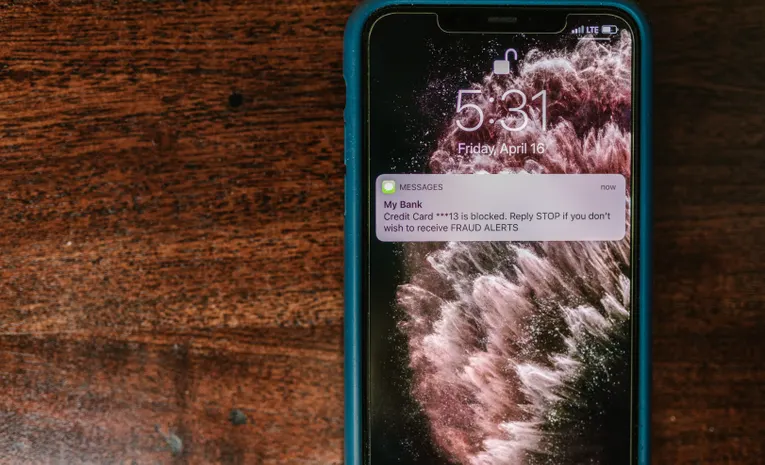
Quick answer: The clearest signs of a smishing text are urgency (“your account is locked,” “act within 24 hours”), an unexpected link you weren’t expecting, a sender number that isn’t a recognised short code, and any request for a one-time verification code, payment, or personal details. Real banks and delivery companies use consistent short codes, never ask for a one-time code by text, and don’t threaten account closure within hours.
Smishing, SMS phishing, is now one of the most-reported scam categories, precisely because a text message gives you far less to inspect than an email. There are no headers, no sender domain to check, just a sender ID and a link. Here is how to tell a genuine text from a scam before you tap anything.
Check the Sender First
Legitimate businesses, banks, delivery companies, and government agencies typically send texts from a recognised 5 or 6-digit short code (something like 454545) or a clearly branded sender ID, not a random 10-digit phone number. If a message claiming to be from your bank arrives from an ordinary phone number, particularly one from an area code or country you have no connection to, treat that as a serious warning sign.
International numbers are an even stronger tell. If you are not expecting contact from overseas and a message claiming to be a domestic company or agency arrives from an international number, that mismatch alone is reason enough to stop and verify independently.
Watch for Urgency and Fear-Based Language
Almost every smishing text leans on the same pressure tactics: “your account has been compromised,” “suspicious login detected,” “package on hold, action required,” or “final notice, respond within 24 hours.” This urgency is deliberate. It is designed to make you act before you have time to apply your normal judgement. No genuine account issue is ever so urgent that it can only be resolved by clicking a link in a text message within a matter of hours.
Inspect the Link Without Tapping It
On iPhone, press and hold a link to preview the actual destination before opening it. On Android, a long press typically does the same. Look specifically for shortened links (bit.ly, tinyurl, or similar), which hide the real destination entirely, and for domains that closely resemble a known brand but are subtly wrong, such as amaz0n-support.com or usps-redelivery.net rather than the company’s genuine domain.
The Most Common Pattern in 2026: Fake Delivery Notifications
An unexpected “your package is delayed” or “delivery requires your action” text, when you have not ordered anything expecting delivery, is currently one of the most common smishing patterns. These messages impersonate postal services and couriers specifically because almost everyone receives genuine delivery texts regularly, making a fake one easy to mistake for routine.
If you receive a delivery notification for something you did not order, do not click the link. Go directly to the courier’s official app or website and check your tracking information there instead.
Never Share a One-Time Verification Code
No legitimate bank, service, or company will ever ask you to read back or forward a one-time verification code you received by text. If a message asks for this, or if you receive an unexpected verification code followed by a call or text asking you to share it, this is a strong sign someone is actively trying to take over one of your accounts. Do not share the code under any circumstances.
Watch for the “Wrong Number” Opener
A newer pattern starts with something disarmingly casual: “Hi, is this Mike?” or a message claiming to be from a colleague or executive needing an urgent favour, often specifying not to call because they are “in a meeting.” This builds a conversation before the scam request appears, making it feel more personal than a generic alert. Law enforcement has specifically warned about scammers impersonating senior officials and executives using exactly this approach. Treat any unexpected, informal contact that later shifts into a request for money, gift cards, or sensitive information with the same caution as an obvious phishing text.
Do Not Reply, Not Even to Opt Out
If you identify a text as a likely scam, do not reply, even with “STOP” or “NO.” This may seem like the safe, polite option, but any reply confirms to the scammer that your number is active and monitored, which can result in more targeted messages, not fewer. The safest response is no response at all.
Verify by Going Around the Message
If a text claims to be from your bank, a delivery company, or a government agency and you want to check whether it’s genuine, don’t use any link or number provided in the text itself. Instead, open the company’s official app directly, or call the number printed on your bank card or a previous genuine statement. This single habit defeats the vast majority of smishing attempts, because it removes the scammer’s control over how you verify the claim.
A Fast Pre-Action Checklist
- Check the sender for a recognised short code rather than a random or international number.
- Notice the urgency, genuine account issues rarely require action within hours via text alone.
- Preview any link before tapping, watching for shortened URLs or near-identical domains.
- Never share a one-time verification code, no legitimate company will ask for one.
- Verify independently through the official app or a number you already trust, never the one in the text.
If You Have Already Clicked or Responded
- Do not enter any information if a page asks for login details or payment information; close it immediately.
- If you shared a verification code or password, change that password immediately and check for unauthorised account activity.
- If you entered card details, contact your card issuer right away to flag the transaction.
- Report the message by forwarding it to 7726 (SPAM on most keypads), which lets your carrier block future texts from that number.
- Block the sending number and delete the message once you’ve reported it.
Common Questions
Is it safe to reply “STOP” to a suspicious text?
No. Even an opt-out reply confirms to the scammer that your number is active, which can lead to more targeted messages. The safest response to a suspected smishing text is no response at all.
How can I tell if a delivery text is fake?
If you have not ordered anything expecting delivery, treat any “your package is delayed” or “action required” text as suspicious. Go directly to the courier’s official app or website to check tracking rather than clicking the link in the text.
Will my bank ever text me asking for a verification code?
No legitimate bank or service will ask you to read back or share a one-time verification code by text. Any request to do so is a strong sign of an account takeover attempt.
What should I do if I already clicked a smishing link?
If you did not enter any information, close the page and consider a security scan. If you entered a password or payment details, change that password immediately and contact your card issuer if payment information was involved.
How do I report a smishing text?
Forward the message to 7726 (SPAM on most keypads) to alert your mobile carrier, then block the sending number.
The Bottom Line
Smishing works because a text message gives you far less to inspect than an email, just a sender and a link, and because urgency pushes people to act before checking. Verifying the sender, previewing links without tapping, never sharing a one-time code, and confirming anything important through a channel you already trust closes off the overwhelming majority of these scams, and takes only a few seconds each time a suspicious text arrives.